Steam Value CheckerBETA
AI Companion · public beta

The gaming sidekick that lives in your Discord.

Say Hey AI and ask. It checks prices, tells you whether to buy now or wait, reads your Steam library, plans your evening, sets up a group, and answers back with real pictures, not walls of text.

It's a beta. It's free to try, it only ever acts for the person asking, and it will tell you when it isn't sure. What beta means

# general

Three ways to ask

1

Say Hey AI

Start a message with Hey AI in any channel it's switched on in. That's it.

2

Mention it

Tag the bot with a question. Mention a friend too and it can find games you both own.

3

Or just ask for how-to

"How do I get Steam verified?" The bot answers with a picture guide by itself, no AI needed.

What it shows you

Answers you can read at a glance

These are the real pictures it posts in chat. Game art, prices and links come with them.

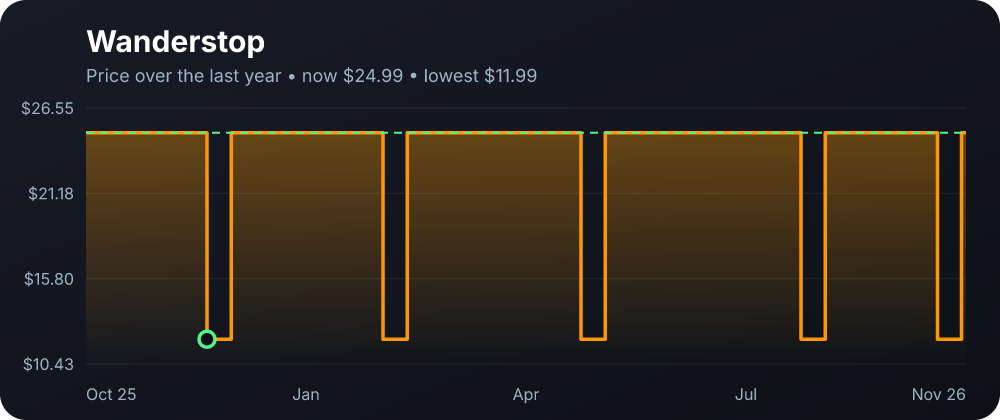
Buy or wait

Is it a good price? It checks a whole year.

A verdict with the reasons, a price-history graph, how often it hit its low, Steam reviews and the next big sale. Buy now, or hold out.

  • Price history with the all-time low marked
  • Counts upcoming Steam sales
  • A button to add it to your wishlist
Price history graph for a game with a dashed line at the current price
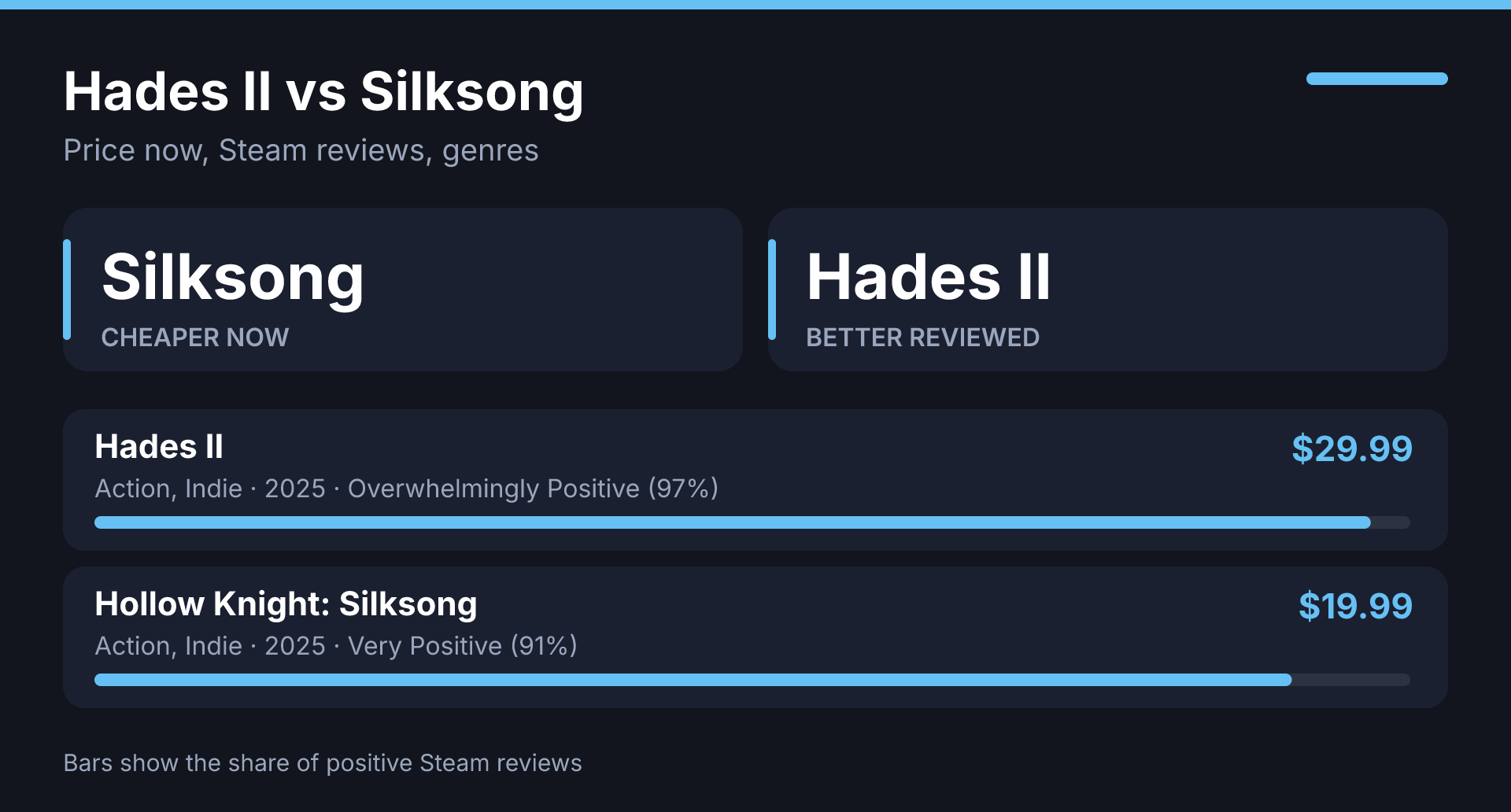
X vs Y

Can't pick between two? It will.

Side by side: price now, discount, review score, genres and release year, with the cheaper and the better reviewed called out.

  • One picture, two games, no tab hopping
  • Review bars from real Steam data
Side by side comparison of two games
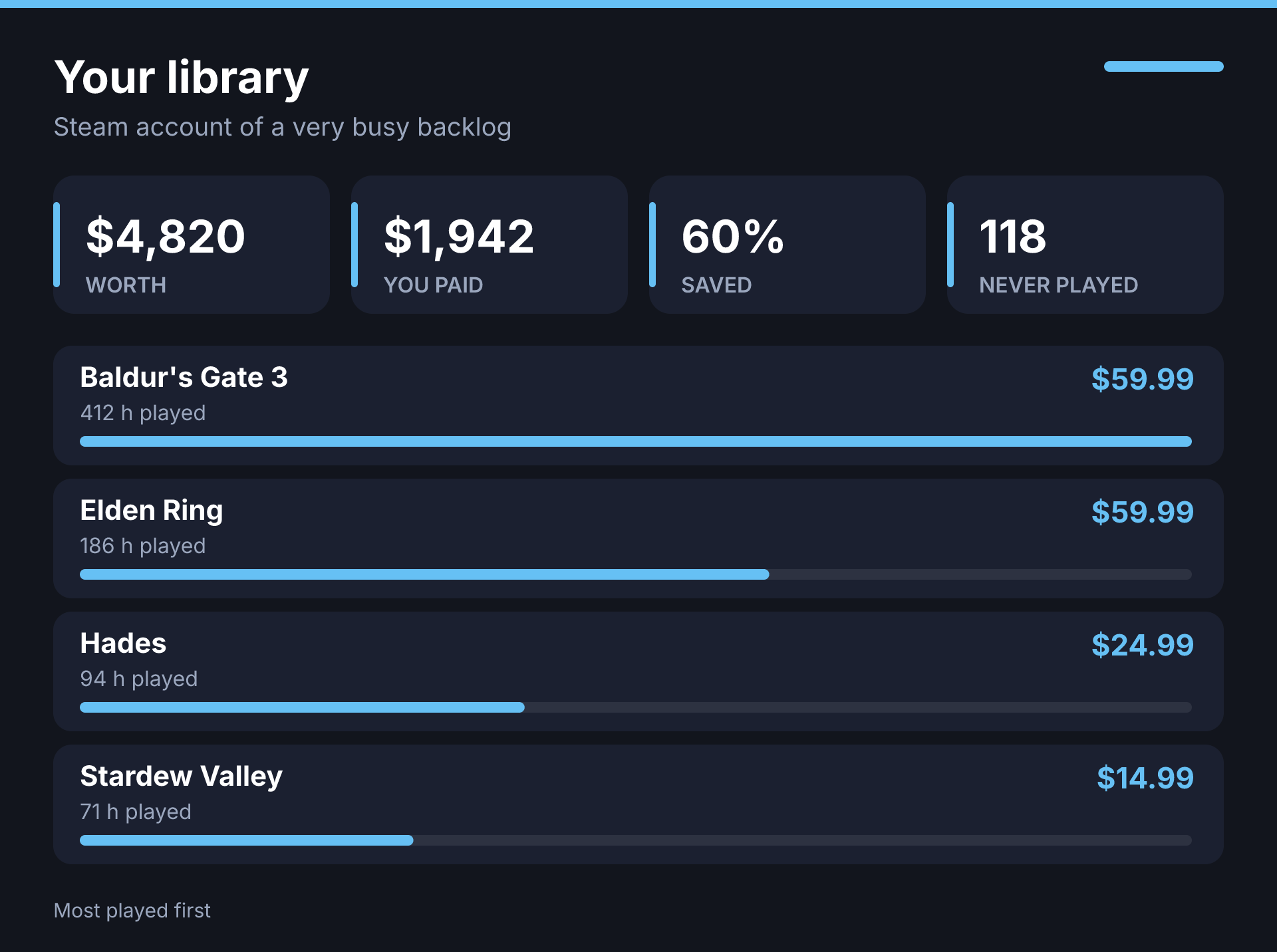
Your library

It knows your account.

Worth, spending, hours, badges, your rarest achievements and your monthly challenge, from your own linked data. Ask in plain words.

  • "What's my library worth?"
  • "What are my rarest achievements?"
  • Links to the matching dashboard page
Library value panel with tiles and most played games
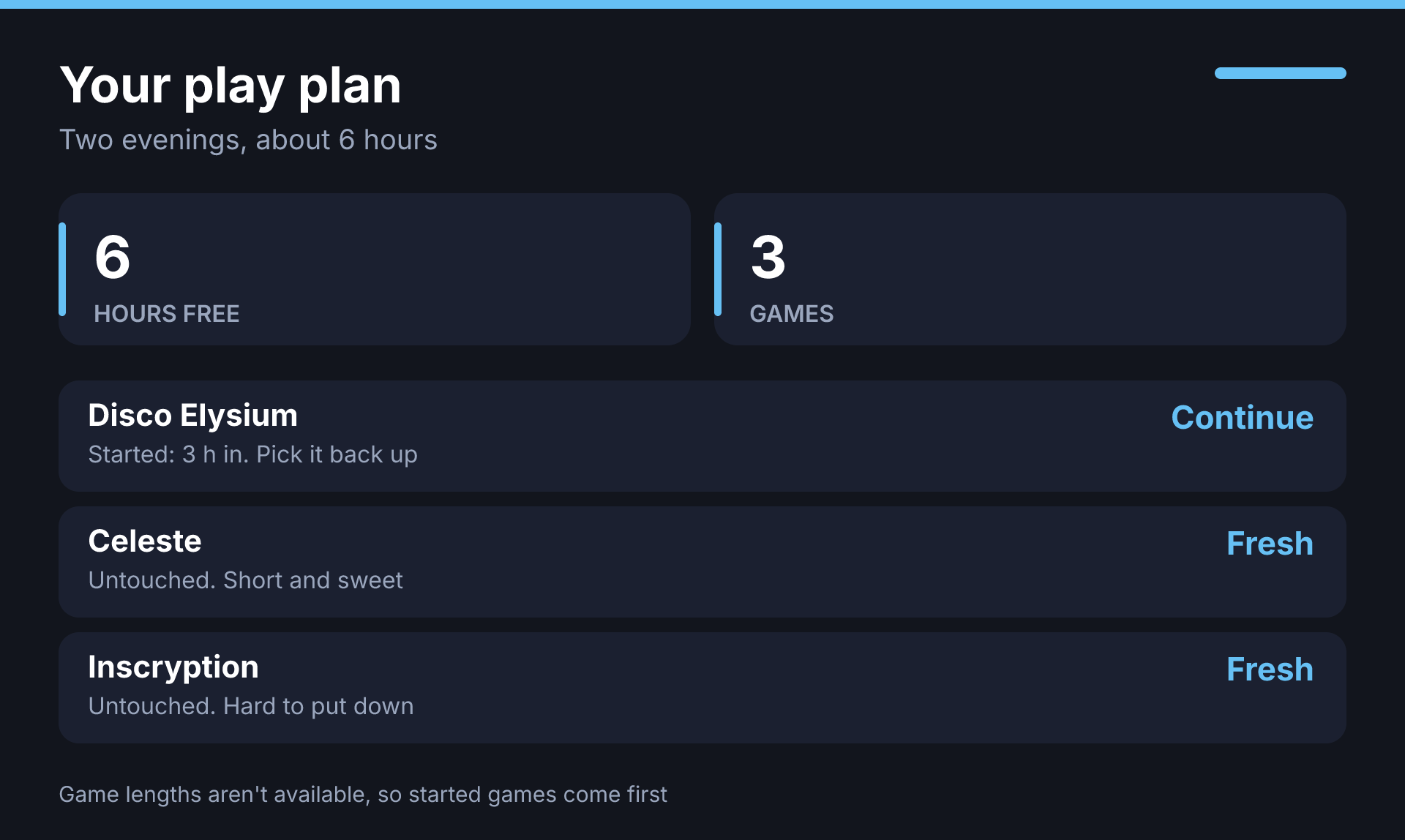
Play plan

"I've got six hours. What should I play?"

It plans your backlog around the time you have, favouring games you already started. Filter by genre or tag, like co-op or roguelike.

  • Honest about not knowing game lengths
  • Play together: games you and a friend both own
A play plan for the evening
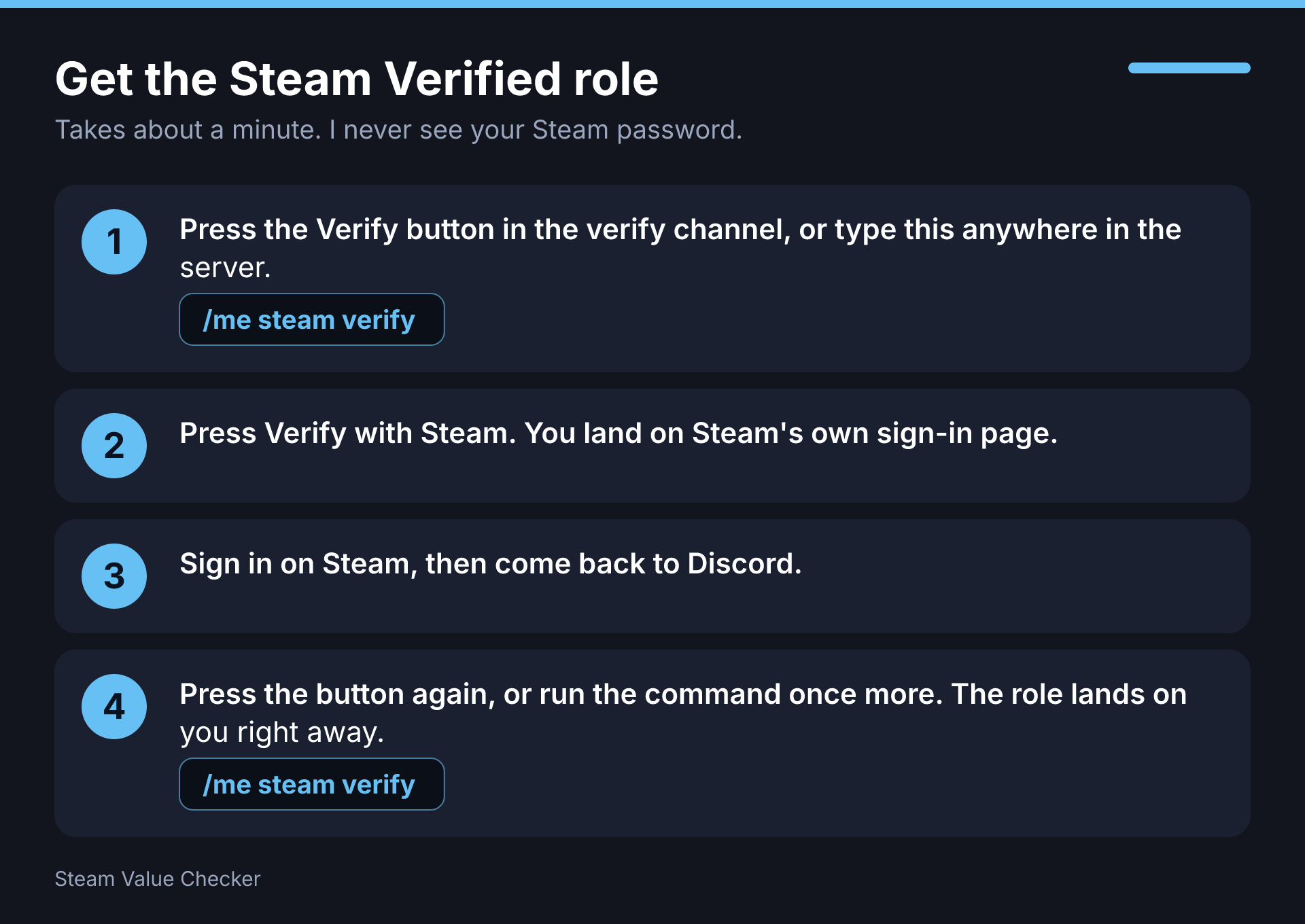
Guides

Step-by-step, with the exact commands.

Ask how to do anything: Steam verified, linking Steam, importing a wishlist, setting up alerts. You get a numbered picture with the commands ready to copy.

  • The bot answers how-to questions on its own
  • Server managers can write their own guides
A numbered step guide for getting the Steam Verified role
The full list

Everything it can do

Forty-plus abilities, all plugged into the same bot you already use.

It does things, not just talks

Ask once, it's done

Every change is for the person who asked, it tells you exactly what it changed, and it never touches anyone else's list.

For server managers

Yours to run

Switch it on where you want

Pick the channels, bring your own AI key if you like, and set a daily cap so a busy server can't run away with it.

/manage community ai

Write your own guides

Rules, roles, channels, "how do I join raids". Add a title, a few phrases and the answer in the dashboard. The bot and the AI use it.

Ask what's left to set up

"Is my server configured?" gets you a checklist of what's done and the command that fixes what isn't.

Events and groups by chat

Ask for a looking-for-group post or a calendar event and it creates the real thing, with a Join button.

BETA

It's new, and it says so

What to expect

  • It can be wrong. Check a price before you buy.
  • Answers and pictures will keep getting better week to week.
  • Some things take a few seconds while it looks them up.
  • Your feedback shapes it. Tell us in the support server.

What it won't do

  • Moderate your server, change settings or run giveaways. It points you to the right command.
  • See anyone's private lists, or yours without your say.
  • Ask for a password, a key or a payment.
  • Remember anything you didn't ask it to. Say "forget everything" any time.

Quick questions

Is it free?

Yes, during the beta. Servers can bring their own AI key, and a daily cap keeps usage in check.

Does it work without an AI key?

Partly. Without one, the bot still answers the most common questions itself: prices, free games, your wishlist, library stats, what to play, and how-to guides.

Who can see my data?

It answers from your own data, for you. Group features like "play together" only use friends who opted in to sharing in that server. Export or delete everything any time from /me mydata.

Why did it reply with a picture?

Because a graph or a table reads faster than a paragraph. The text under it stays short on purpose.

It got something wrong.

That's what the beta is for. Use /bot bug or the support server and say what you asked.

Give it a go

Add the bot, switch the AI on in a channel, and say Hey AI.